Dinevate vs Popmenu
Dinevate is one system: your website, online ordering, branded app, AI phone line and front counter all run on one menu and one customer record. Onboarding is a set $499, one time, and the ongoing arrangement after launch is built around your restaurant.
One order pipeline
A phone order and a website order are the same thing in the same system, on the same tablet, against the same customer.
Ordering like a chain app
Each category opens as its own page, and pizzas can be built half-and-half with topping prices that follow the size you picked.
Real pages, not just tags
We write full local articles about your food and your town and publish them on your own website, not ours.
Priced around your restaurant
A set $499 to get started, an ongoing arrangement after launch, and four add-ons you turn on only if you want them.
This is the ordering your guests get
Not a mockup — your menu, on your own domain and in your own branded app, with the checkout guests already know from the national chains.
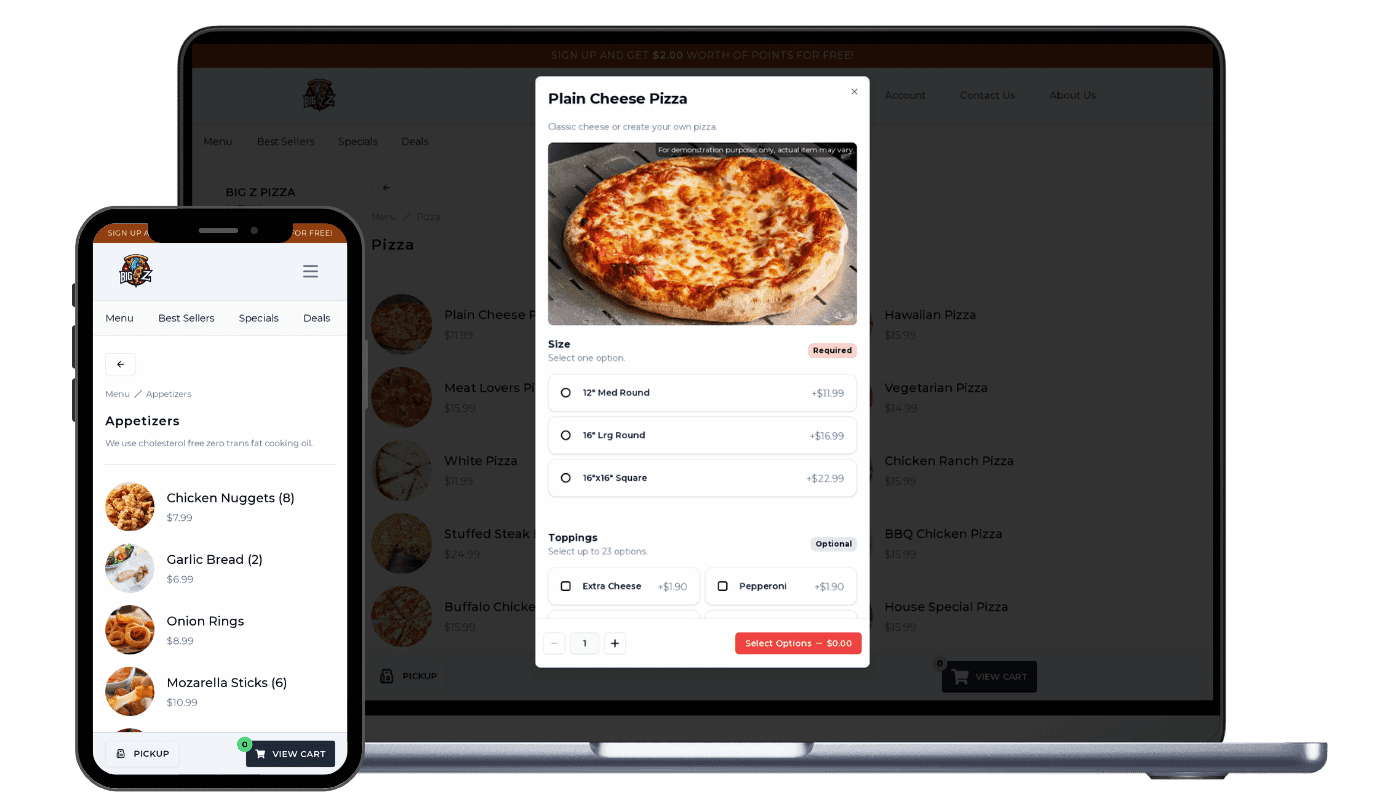
- Its own page, not a scroll position
- Note the “Menu / Pizza” breadcrumb. Each category is a routed, prefetched page — so it opens instantly and Google can index it on its own.
- Options built for real menus
- Size marked Required, Toppings marked Optional, each with its own price. Half-and-half placement and size-aware topping pricing work the same way.
- The same thing on a phone
- The phone is the primary layout, not a shrunken desktop — and the same menu drives your branded app, the AI phone line and your register.
Choose Dinevate if…
You want the website, the ordering, the app, the phone line and the counter to be one system on one guest list — and real local articles about your food published on your own website, measured in Google Search Console.
Choose Popmenu if…
Your decision is really about dish-level guest reviews on the menu itself, and you are comfortable with online ordering and phone answering as separate add-ons on top of the monthly plan.
Dinevate vs Popmenu at a glance
| Feature | Dinevate | Popmenu |
|---|---|---|
| Ways a guest can order | Website, your own app, the phone and the front counter, all one system | Website and menus in the plan; ordering and phone answering are separate |
| How the menu is laid out | Each category opens as its own page — instant to tap, and listed by Google | On the flow we tested, one long ordering page with a side category list |
| Building the order | Half-and-half pizzas, topping prices that follow the size, light or extra | Menus built around guest reviews attached to individual dishes |
| Guests coming back | Saved cards and one tap to reorder a past order exactly as it was | On the flow we tested there was no sign-in, saved card or reorder |
| Getting found locally | Real articles about your food and your town, on your own website | By stated policy they do not publish local landing pages |
| Your Google listing | We update your Google listing daily, including the Order online button | Sends your business listing data out to online directories |
| What has a price on it | A set $499 to start, then an ongoing arrangement, and four named add-ons | $159–$449 a month; ordering is an add-on, phone answering from $149 |
| Your point of sale | Works alongside the register you already have, or runs the counter itself | Connects to point-of-sale systems |
Popmenu details are general and may change — check the vendor's site for current specifics. Last updated 2026-08-26.
What is Popmenu?
Popmenu is a restaurant marketing platform built around interactive, dish-level menus. As of August 2026 it publishes three tiers — Starter $159, Essentials $269 and Premier $449 per month prepaid annually, roughly $179, $299 and $499 month to month — with no free trial and no self-serve signup. The platform covers websites and menus, marketing and review tools, connects to point-of-sale systems, and syndicates business listing data through Yext. Online ordering is an add-on at all three published tiers with no published module price, though as of September 2026 Popmenu's pricing FAQ discloses a flat $1.00 fee per online order; AI phone answering is an add-on that starts at $149 per month; waitlist, reservations and audience segmentation are included at the Premier tier as of September 2026, while paid ads and gift cards remain unpriced; Popmenu's Solutions page describes Loyalty as included in every subscription, while its Pricing page marks it coming soon / add-on. On the one Popmenu ordering flow we tested in August 2026, checkout was guest-only with no sign-in, account, saved card or reorder, the marketing opt-in was pre-checked, and a $0.99 "Support Local Fee" appeared at checkout — stated as what that dated flow showed, not as a platform-wide absence. Popmenu also takes a public position against publishing bulk AI-generated landing pages, which we agree with on the merits: it is exactly why our local article set is capped at 10–16 pages per restaurant and audited against Search Console rather than mass-produced.
What is Dinevate?
Dinevate is one restaurant operating system, not a website with ordering attached. Website checkout, the branded mobile app, the AI phone agent and the in-store register all place orders through the same pipeline, so nothing can drift between channels — the same tax logic, the same discount check, the same duplicate guard, the same confirmation email, the same printing. Every one of those orders lands on the same Order Manager tablet, so a phone order looks exactly like a website order on the kitchen screen and there is no separate "AI orders" inbox to remember to check. One menu record feeds the website, the app, what the phone AI says out loud, the register and Google's food-ordering feeds, so you price a dish once. A caller the phone AI recognises by number is matched to the same customer account the website and app use — saved addresses, saved cards — and a first-time caller is created as a customer record with the order attached, into the same list your email marketing sends to; that link only exists when the phone line and the website are the same product on the same database, not a site platform plus a separately sold ordering module plus a separately sold phone module. Because the channel is stamped on every order, your dashboard draws one "How Customers Order" breakdown across website, app, phone and counter. Commercially: the $499 one-time onboarding covers your website, online ordering, loyalty, local SEO, email marketing and the Order Manager tablet, which is loaned and remains Dinevate property — and your branded iPhone and Android app is included as well, with no separate subscription. After launch you are on an ongoing arrangement, either a per-order service fee or a flat monthly, whichever fits your restaurant, with no contract and no cancellation penalty; there is an ongoing cost, and we would rather tell you here than in month two. Four products are add-ons with their own subscriptions: reservations, Dinevate Voice AI, Catering Pro and Social Media Pro. Dinevate Delivery is not a subscription at all — it is the delivery itself, dispatched to the best-rated drivers in your area with 100% of the tip going to the driver, paid per delivery, only when you use it.
Why restaurants choose Dinevate over Popmenu
One system, not a plan plus modules
Your website order, your app order, your phone order and your counter order all run through the same pipeline and land on the same tablet, against the same guest record. That is why a first-time caller becomes a contact you can market to with no extra step, and why your dashboard can show a single breakdown of how customers order across website, app, phone and in-store. Your branded iPhone and Android app is included; Dinevate Voice AI is an add-on with its own pricing — a commission on the orders it takes plus a $200/month account minimum — and it answers in English.
Ordering built the way a national chain builds it
Almost every ordering platform in this category renders the whole menu as one long document and gives you a jump-link to scroll inside it. Dinevate gives each category its own page, prefetched the moment the menu loads, cached, and indexable on its own — so it behaves like an app and ranks like a website. Inside an item, a pizza can be built half-and-half with each topping placed, topping prices follow the size the guest picked, every ingredient can be light, normal, extra or on the side, and a popular combination applies a whole proven build in one tap.
We write the pages, not just the tags
Popmenu takes a public position against publishing bulk AI-generated landing pages, and on the Popmenu-built site we audited in August 2026 sitemap.xml contained 7 URLs — the homepage, four legal pages, /order-online and /menu — with no dish pages and no local articles. Dinevate publishes 10 to 16 full local articles for a single-location restaurant on the restaurant's own domain, written from your live menu, real addresses, real hours and current deals, with the writer forbidden from inventing dishes, awards or promotions. Then we register and verify your domain in Google Search Console, submit your sitemap, and report what each individual page earned.
Priced around your restaurant, then stated plainly
Onboarding is $499, one time, the same set price for everyone, and it covers your website, online ordering, loyalty, local SEO, email marketing and the Order Manager tablet, which is loaned and stays Dinevate property. After launch you are on an ongoing arrangement — a per-order service fee or a flat monthly, whichever fits your restaurant — quoted after we look at your volume, ticket, channel mix and location count. There is no contract and no cancellation penalty, and there is an ongoing cost: we will never tell you nothing recurs.
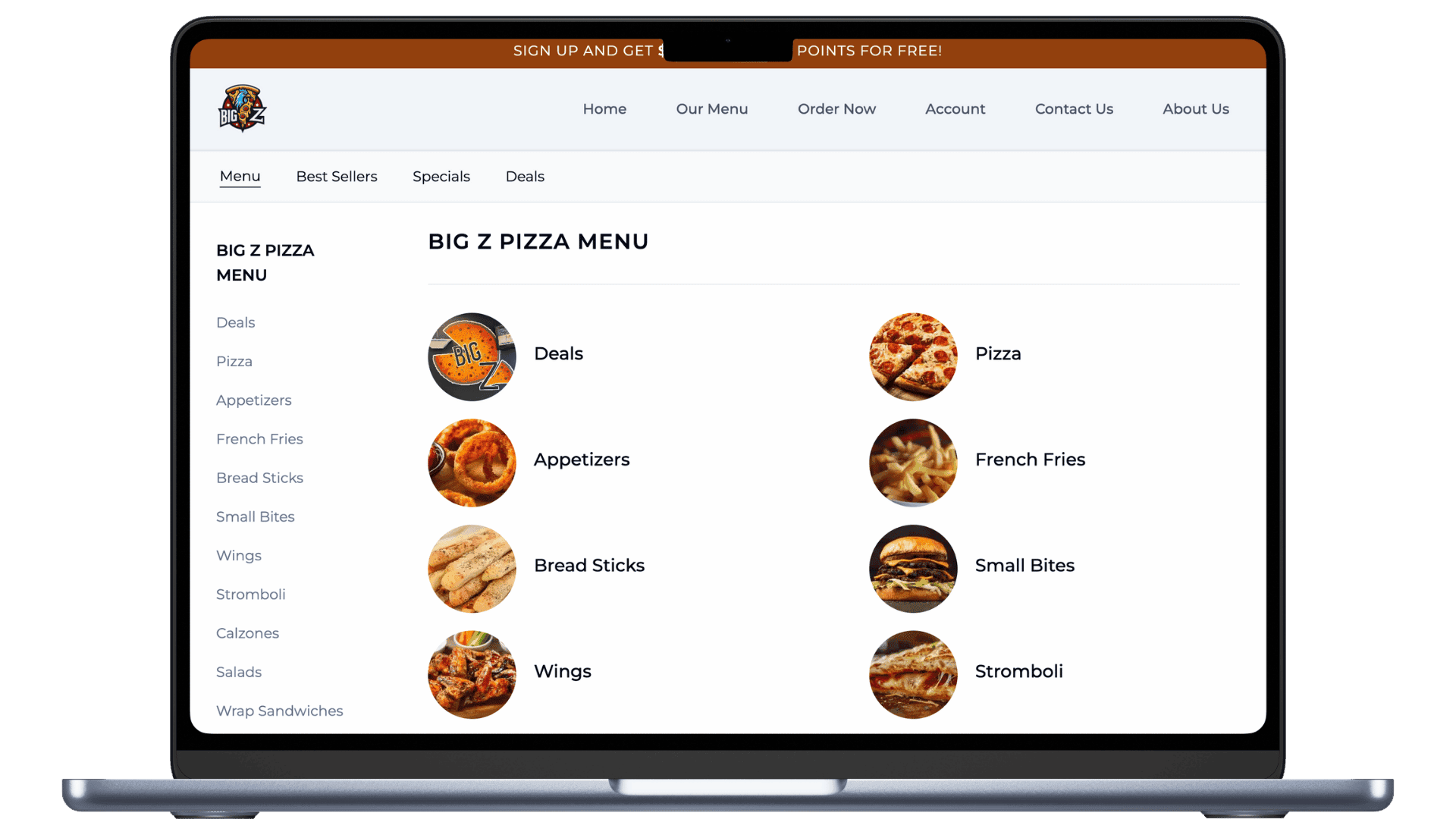
Most vendors sell a website and an ordering page, then bolt on the rest. In Dinevate they were never separate.
Your website, your online ordering, your branded app, the AI that answers your phone and the register at your counter all run on one menu, one order pipeline and one customer record. That is not a longer feature list — it is a different architecture, and it is what a website-plus-ordering vendor cannot copy without rebuilding.
One order pipeline, whichever door it came through
A website order, an order from your branded app, an order the AI took on the phone, and an order rung up at the counter are the same kind of order in the same system — same tax logic, same discounts, same duplicate protection, same confirmation. Nothing drifts between channels because there is no second channel to drift from.
One screen in the kitchen
Every order lands on the same Order Manager tablet and the same printer flow. A phone order looks exactly like a website order to your staff. There is no separate inbox to remember to check.
One menu behind every surface
The same menu drives your website, your app, what the AI says on the phone, the in-store register, and your Google food-ordering feeds. You price a dish once and it is priced everywhere.
One customer, however they reached you
When a regular calls, the AI recognizes the number against the same customer account the website uses — their name, their saved addresses. A caller who has never touched your website becomes a customer record with the order attached, and that record is the audience your email marketing already uses.
One list for reservations, one pipeline for catering
Bookings from the website, the app, the phone and the walk-in podium are a single list synced to the tablet. Catering inquiries taken on a call land in the same pipeline as the ones from your website form.
One chart a bolted-together stack cannot draw
Because the channel is recorded on every order, your dashboard shows one breakdown of how your customers actually order — website, app, phone, in-store — side by side. Vendors running separate systems for each channel have no single place that number exists.
And the ordering itself is built like a chain app
This is the part guests feel. Your regulars already know how the big chains order — Dinevate holds your menu to that standard.
Each category is its own page, not a scroll position
Most ordering platforms render your whole menu as one long document and give guests a jump-link to scroll inside it. Dinevate gives every category its own page, prefetched the moment the menu loads so it opens instantly — and individually indexable by Google. It behaves like an app and it ranks like a website.
Customization built for real menus
Half-and-half pizza with visual placement on the pie. Topping prices that follow the size automatically. Light, Normal, Extra or On the Side per ingredient. Required picks, pick-three budgets, nested sub-groups, and “these come included — tap to remove what you don’t want.”
Nobody gets stuck at the Add button
Miss a required choice and the button tells you so, then scrolls you straight to the group you missed and highlights it. The running price updates live on the button as you build the item.
Suggestions from your own order history
After an item is added, the suggestions that appear are computed from what your customers actually buy together, refreshed weekly — not a generic upsell list. Popular Combinations applies an entire proven build, every option included, in one tap.
Reorder that actually rebuilds the order
One tap rebuilds a past order with every modifier and special request intact. Favorites remember the exact options, not just the dish.
A checkout that does not lose people
Apple Pay and Google Pay where the processor supports them, saved cards, and guest checkout with no account wall. Four steps that collapse as you finish them, the order summary first on a phone, address autocomplete with a confirmation step, and honest longer wait times shown before the guest commits.
Everything Dinevate runs for you
Included
Covered by your $499 onboarding and your ongoing arrangement
Online Ordering
A fast restaurant online ordering system for pickup, delivery, Apple Pay, Google Pay, and direct customer data.
Restaurant Mobile App
Your own branded iPhone and Android app with full ordering, one-tap reorder, loyalty, wallet, and saved cards.
Restaurant Website
A restaurant website builder with online ordering, local SEO pages, menus, hours, photos, and direct checkout.
Email Marketing
Restaurant email marketing for birthdays, offers, order follow-ups, and win-back campaigns.
Restaurant SEO & Local Marketing
Restaurant SEO and local marketing that helps hungry customers find you on Google.
Loyalty & Rewards
A restaurant loyalty program with points, rewards, offers, and customer accounts.
Order Manager
A tablet order manager for accepting, tracking, and handling restaurant orders from one place.
Delivery Manager App
Delivery management tools for drivers, tracking, service areas, and restaurant delivery operations.
Menu management
One menu record feeding every surface — sizes, half-and-half, nested option groups, time-of-day categories.
Customer records you can export
Every guest — web, app, phone, walk-in — in one list with their order history, exportable to CSV whenever you want.
Google Search Console setup and reporting
We register your domain, verify it, submit your sitemap, then report clicks, impressions and position back to you per page.
Google Business Profile sync
A daily job keeps your website, menu link and “Order online” button pointed at you — and reclaims that button when a marketplace has taken it.
Wallet, gift cards and promo codes
Stored balance with cashback, gift cards redeemed by code, and promo codes — all available at the same checkout.
Merchant dashboard
Earnings, completed orders, average ticket, how customers order by channel, menu insights, statements and disputes.
In-store register and kitchen display
Available when you want it: floor map, tabs, terminal payments, staff logins with role permissions, and an end-of-day drawer count.
Order printing built for a real kitchen
Multiple printers with per-station routing, your logo, and a lead time so scheduled orders print just before they are needed.
Add-ons
Their own subscription — never inside the $499
Reservations
Website, phone, app and walk-in bookings in one list, synced to the tablet.
Dinevate Voice AI
AI phone ordering for restaurants that answers calls, takes orders, and handles reservations.
Dinevate Catering Pro
Catering software for estimates, deposits, invoices, and large restaurant orders.
Social Media Manager
Restaurant social media tools for posts, scheduling, reviews, and local customer engagement.
Dinevate Delivery — not an add-on
It is the delivery itself, not a subscription. We dispatch the best-rated driver in your area, 100% of the tip goes to the driver, and the fee depends on your area and the distance. You pay per delivery, only when you use it.
How Dinevate Delivery worksFrequently asked questions
- Is Dinevate a good alternative to Popmenu?
- Yes, if what you want is one system rather than a plan with ordering bought alongside it. Dinevate runs your website, online ordering, your branded app, loyalty, local SEO and email marketing off one menu and one customer record, with every order — web, app, phone, counter — arriving on the same tablet. Reservations, Dinevate Voice AI, Catering Pro and Social Media Pro are add-ons with their own subscriptions. If dish-level guest reviews on the menu are the centre of your marketing, that is what Popmenu is built around; if you want the phone, the counter and the website to be the same system, that is what Dinevate is.
- Does Popmenu include online ordering?
- Not in the published tiers. On Popmenu's pricing page in August 2026, online ordering is an add-on at Starter, Essentials and Premier alike, so the $159–$449 per month headline does not include it, and Popmenu publishes no module price for it, though its pricing FAQ discloses a flat $1.00 fee per online order; AI phone answering starts at $149 a month, and gift cards and paid ads carry no published price. On the Popmenu ordering flow we tested in August 2026, a $0.99 "Support Local Fee" appeared at checkout. With Dinevate, online ordering is not a module you add on — it is what the $499 onboarding sets up, and after launch you are on an ongoing arrangement, per-order or flat monthly.
- How is Dinevate's online ordering actually different?
- Architecture first. On the Popmenu flow we tested in August 2026, the menu rendered as one ordering page with a category rail down the side; Dinevate gives every category its own page, prefetched the moment the menu loads, cached and indexable on its own, so it behaves like an app and ranks like a website. Then depth: half-and-half pizzas with each topping placed on the left half, the whole pie or the right half; topping prices that follow the chosen size; every ingredient light, normal, extra or on the side; "pick 3 total, repeats allowed" budgets with live remaining headroom; and one tap on a past order rebuilding it with every modifier and special request. Best Sellers and popular-combination badges are computed from your own order history and hide themselves until you have enough of it to be honest.
- Popmenu says bulk AI landing pages are spam. Isn't your SEO the same thing?
- We agree with the principle, and we enforced it on ourselves. Bulk near-duplicate pages are doorway spam under Google's own policy. On 2026-08-05 we audited 51 merchant properties against Search Console, found 85% of our old page inventory had earned zero clicks in 90 days, and deleted 8,252 pages across 47 restaurants with a full row-level backup and no measured clicks lost. What we publish now is deliberately capped: 10–16 full articles for a single-location restaurant, 4–8 per location plus up to 6 brand pages for a group, with a hard ceiling of 60. Brand-and-city and menu pages are mandatory; generic "cheap X near me" and coupon permutations are banned outright. Every page reports its own clicks and impressions in your dashboard, so you can see what each one earned.
- What does Dinevate cost, and what recurs?
- What's fixed: $499 onboarding, one time, the same price for everyone. It covers your website, online ordering, loyalty, local SEO, email marketing and the Order Manager tablet — the tablet is loaned and remains Dinevate property — and your branded iPhone and Android app is included too, with no separate price. What's ongoing: after launch you are on an ongoing arrangement, either a per-order service fee or a flat monthly, whichever fits your restaurant better. There is no contract and no cancellation penalty, but there is an ongoing cost. What's separate: four add-ons with their own subscriptions — reservations, Dinevate Voice AI, Catering Pro and Social Media Pro — plus one-time signup items that are not inside the $499: Pro Photo Service $99, receipt printer $299 each, kitchen display $249 each, and SEO tier upgrades at +$399 or +$999. Dinevate Delivery is not an add-on and not a subscription: it is the delivery itself, 100% of the tip to the driver, a fee that varies by area and distance, paid per delivery only when you use it.
- Do I need to replace my POS to switch?
- No. Dinevate is not a POS replacement — your website, ordering, app, SEO and marketing run alongside the point of sale you already use, and menu changes are made once in Dinevate and flow to every surface. If you do want the counter on the same system, an in-store register mode with employee logins, role permissions and a kitchen display is available and enabled per restaurant, which puts walk-in orders in the same customer history as your web and phone orders.