Dinevate vs BentoBox
Dinevate is one restaurant system: your website, online ordering, branded app and in-store register share one menu, one order pipeline and one customer record. Onboarding is a set $499, one time, and after launch there's an ongoing arrangement — no contract.
The phone answers too
Dinevate Voice AI is an add-on that takes the whole order by phone in English, onto the same kitchen screen and the same customer record as a website order.
Ordering like a chain app
Every menu section is its own fast page, and a pizza can be built half-and-half with topping prices that follow the size.
Local pages we write
We write 10 to 16 full local articles from your live menu, publish them on your own domain, and report what each one earns.
What's included, what's extra
The branded mobile app is included; reservations, Voice AI, Catering Pro and Social Media Pro are add-ons, and nothing about your point of sale has to change.
This is the ordering your guests get
Not a mockup — your menu, on your own domain and in your own branded app, with the checkout guests already know from the national chains.
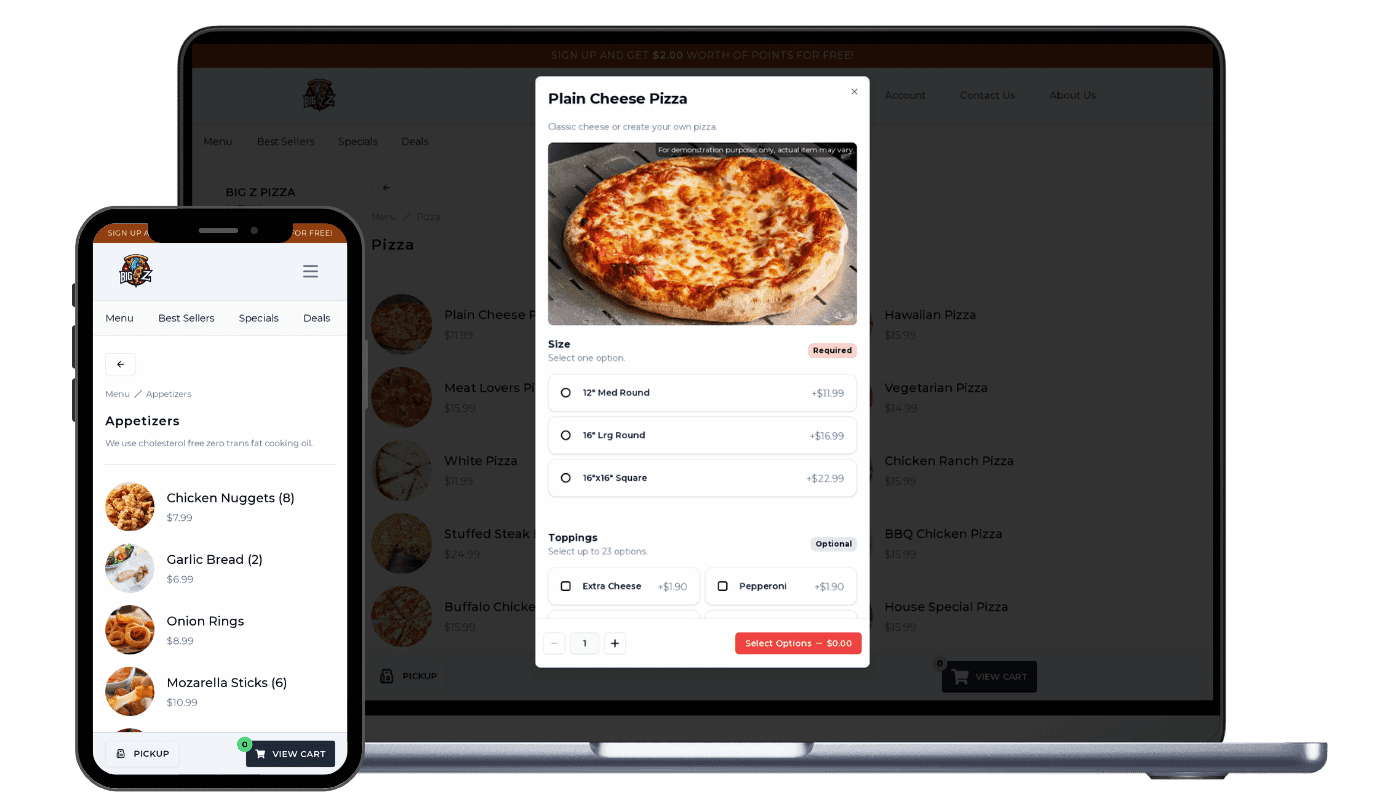
- Its own page, not a scroll position
- Note the “Menu / Pizza” breadcrumb. Each category is a routed, prefetched page — so it opens instantly and Google can index it on its own.
- Options built for real menus
- Size marked Required, Toppings marked Optional, each with its own price. Half-and-half placement and size-aware topping pricing work the same way.
- The same thing on a phone
- The phone is the primary layout, not a shrunken desktop — and the same menu drives your branded app, the AI phone line and your register.
Choose Dinevate if…
You want ordering, the phone, the app and your local search pages to be one system on your own domain — and you don't want to change your point of sale to get it.
Choose BentoBox if…
You're already on Clover point of sale, and the decision is really about ticketed events and private dining — BentoBox sells event ticketing and Dinevate does not.
Dinevate vs BentoBox at a glance
| Feature | Dinevate | BentoBox |
|---|---|---|
| Where your orders come from | Website, your own app, phone calls and the front counter, all in one place | Website, ordering, events, ticketing, reservations and QR pay at the table |
| When a customer phones in | The call is answered and the order lands on the same screen as a web order | No phone product, so a call never reaches the customer's record |
| How your menu is laid out | Each menu section opens as its own fast page, the way a big chain's app does | One long menu page; tapping a section jumps you down it, same web address |
| Finding a dish quickly | A search box on the menu that looks inside item names and descriptions | Their own help docs: a search bar appears only once the menu passes 20 items |
| How much a customer can customize | Half-and-half pizzas, topping prices that follow the size, Light or Extra | Modifier groups inside their online-ordering module |
| Customers ordering again | One tap rebuilds a past order with every option, and cards can be saved | Their own help docs: a saved card works at that one restaurant only |
| Getting found locally | Real articles about your food and your town, published on your own website | Technical setup and editable page text — you write the content yourself |
| Do you have to change your register? | No. Nothing about your point of sale has to change for you to launch | Their pricing page: new customers have to be on Clover point of sale |
| What it costs | $499 to get set up, one time, then an ongoing arrangement. No contract | No prices published; a live menu shows a $0.99 service fee on each order |
BentoBox details are general and may change — check the vendor's site for current specifics. Last updated 2026-08-26.
What is BentoBox?
BentoBox is a restaurant website and hospitality platform, now part of Clover (Fiserv). Its suite covers websites, online ordering, events and ticketing, reservations and dine-in QR payment. Two facts about its 2026 shape matter before you sign. First, adoption now runs through Clover: BentoBox's own pricing page states that new customers must be Clover POS customers, and its product pages for SEO, online ordering and reservations now redirect to clover.com — so moving to BentoBox can mean moving your point of sale, not just your website. Second, that pricing page publishes no prices. Sauce (May 2026) reports about $49/month plus $0.99 per order plus roughly 3% card processing, modeled at around $700/month for a restaurant doing 300 orders a month, and a live BentoBox menu displays “A one-time $0.99 Online Order Service Fee applies to each order.” Because none of that comes from BentoBox, treat those numbers as third-party estimates rather than a quote — Dinevate's onboarding price, $499 one time, is stated on this page.
What is Dinevate?
Dinevate is one restaurant operating system, not a website with ordering bolted on. Website checkout, the in-store register, your branded mobile app and — as an add-on — the AI phone line all call the same order function, so a phone order and a website order are literally the same thing in the same place: one menu you price once and every surface shows, one kitchen screen with no separate “AI orders” inbox to remember, one customer record the phone agent matches by number against the same account the website uses, and one “How Customers Order” chart on your dashboard covering web, app, phone and counter. A vendor selling a website plus an ordering module cannot build that link, because there is no phone product sitting on the same database. Onboarding is $499, one time — a set price, the same for every restaurant — covering your website, online ordering, loyalty, the local SEO program, email marketing and the Order Manager tablet, which is loaned and remains Dinevate property. Your branded iPhone and Android app is included as well, with no separate subscription. Four products are add-ons with their own subscriptions: reservations, Dinevate Voice AI, Catering Pro and Social Media Pro. After launch every restaurant is on an ongoing arrangement — a per-order service fee or a flat monthly, whichever fits your restaurant better — with no contract and no cancellation penalty, but there is an ongoing cost and we would rather tell you here than in month two. Dinevate Delivery is not a subscription at all: it is the delivery itself, dispatched to the best-rated drivers in your area with 100% of the tip going to the driver, paid per delivery only when you use it.
Why restaurants choose Dinevate over BentoBox
The phone was never a separate system
Website checkout, the register, your branded app and — as an add-on — Dinevate Voice AI all run through the same order function, so a call lands on the same kitchen screen as a web order and against the same customer account, matched by phone number, with saved addresses and cards already there. BentoBox's suite has no phone-ordering product, so a call cannot post into the same pipeline or the same guest record. It is also why your dashboard can draw one “How Customers Order” breakdown across web, app, phone and counter — Voice AI priced separately, a commission on the orders it takes plus a $200/month account minimum, answering in English.
Each menu section is its own page, not a jump-link
On a BentoBox menu the categories are anchor jumps inside one continuous page and the web address does not change as you move between them. Dinevate gives every category its own page, loaded in advance so taps are instant, cached, and indexable by Google on its own — it behaves like an app and it ranks like a website. Inside an item you get half-and-half pizzas with visual placement, topping prices that follow the size the guest picked, Light / Normal / Extra / On the Side per ingredient, and a required choice you missed that scrolls into view instead of a dead button.
We write the local pages; their guide asks you to
BentoBox gives you metadata fields you fill in yourself — their own SEO guide instructs the restaurant to write the content. Dinevate writes 10 to 16 full local articles for a single-location restaurant, on your domain, from your live menu, real hours, real delivery times and current deals, in the language your menu is actually written in. The cap is deliberate, because bulk near-duplicate pages get treated as spam: we register and verify your domain in Search Console, submit the sitemap, then report clicks, impressions, position and what each individual page earned — and in August 2026 we deleted 8,252 of our own pages after measuring that they had earned nothing.
Nothing to switch, and the price is on the page
BentoBox's pricing page states that new customers must be Clover POS customers, and its SEO, online-ordering and reservations pages now redirect to clover.com, so adopting it can be a point-of-sale migration rather than a website change. Dinevate asks you to switch nothing to launch — the site, the ordering and the tablet stand on their own, and our own register mode is there when you want it, enabled per restaurant. And the fixed number is stated up front: $499 onboarding, one time, the same for everyone, then a per-order service fee or a flat monthly built around your volume, with no contract — while BentoBox publishes no prices at all and a live BentoBox menu shows a $0.99 service fee on each order.
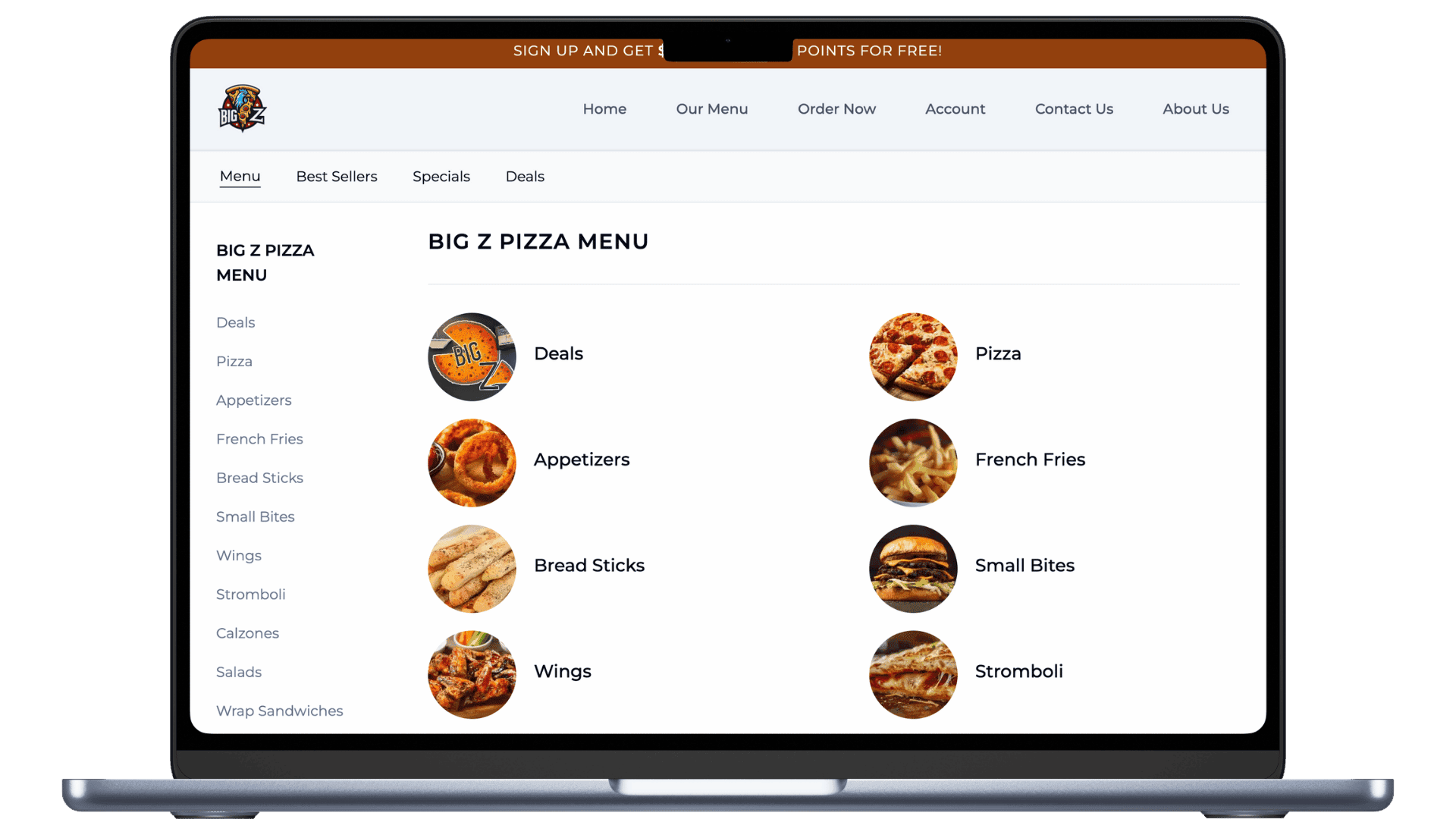
Most vendors sell a website and an ordering page, then bolt on the rest. In Dinevate they were never separate.
Your website, your online ordering, your branded app, the AI that answers your phone and the register at your counter all run on one menu, one order pipeline and one customer record. That is not a longer feature list — it is a different architecture, and it is what a website-plus-ordering vendor cannot copy without rebuilding.
One order pipeline, whichever door it came through
A website order, an order from your branded app, an order the AI took on the phone, and an order rung up at the counter are the same kind of order in the same system — same tax logic, same discounts, same duplicate protection, same confirmation. Nothing drifts between channels because there is no second channel to drift from.
One screen in the kitchen
Every order lands on the same Order Manager tablet and the same printer flow. A phone order looks exactly like a website order to your staff. There is no separate inbox to remember to check.
One menu behind every surface
The same menu drives your website, your app, what the AI says on the phone, the in-store register, and your Google food-ordering feeds. You price a dish once and it is priced everywhere.
One customer, however they reached you
When a regular calls, the AI recognizes the number against the same customer account the website uses — their name, their saved addresses. A caller who has never touched your website becomes a customer record with the order attached, and that record is the audience your email marketing already uses.
One list for reservations, one pipeline for catering
Bookings from the website, the app, the phone and the walk-in podium are a single list synced to the tablet. Catering inquiries taken on a call land in the same pipeline as the ones from your website form.
One chart a bolted-together stack cannot draw
Because the channel is recorded on every order, your dashboard shows one breakdown of how your customers actually order — website, app, phone, in-store — side by side. Vendors running separate systems for each channel have no single place that number exists.
And the ordering itself is built like a chain app
This is the part guests feel. Your regulars already know how the big chains order — Dinevate holds your menu to that standard.
Each category is its own page, not a scroll position
Most ordering platforms render your whole menu as one long document and give guests a jump-link to scroll inside it. Dinevate gives every category its own page, prefetched the moment the menu loads so it opens instantly — and individually indexable by Google. It behaves like an app and it ranks like a website.
Customization built for real menus
Half-and-half pizza with visual placement on the pie. Topping prices that follow the size automatically. Light, Normal, Extra or On the Side per ingredient. Required picks, pick-three budgets, nested sub-groups, and “these come included — tap to remove what you don’t want.”
Nobody gets stuck at the Add button
Miss a required choice and the button tells you so, then scrolls you straight to the group you missed and highlights it. The running price updates live on the button as you build the item.
Suggestions from your own order history
After an item is added, the suggestions that appear are computed from what your customers actually buy together, refreshed weekly — not a generic upsell list. Popular Combinations applies an entire proven build, every option included, in one tap.
Reorder that actually rebuilds the order
One tap rebuilds a past order with every modifier and special request intact. Favorites remember the exact options, not just the dish.
A checkout that does not lose people
Apple Pay and Google Pay where the processor supports them, saved cards, and guest checkout with no account wall. Four steps that collapse as you finish them, the order summary first on a phone, address autocomplete with a confirmation step, and honest longer wait times shown before the guest commits.
Everything Dinevate runs for you
Included
Covered by your $499 onboarding and your ongoing arrangement
Online Ordering
A fast restaurant online ordering system for pickup, delivery, Apple Pay, Google Pay, and direct customer data.
Restaurant Mobile App
Your own branded iPhone and Android app with full ordering, one-tap reorder, loyalty, wallet, and saved cards.
Restaurant Website
A restaurant website builder with online ordering, local SEO pages, menus, hours, photos, and direct checkout.
Email Marketing
Restaurant email marketing for birthdays, offers, order follow-ups, and win-back campaigns.
Restaurant SEO & Local Marketing
Restaurant SEO and local marketing that helps hungry customers find you on Google.
Loyalty & Rewards
A restaurant loyalty program with points, rewards, offers, and customer accounts.
Order Manager
A tablet order manager for accepting, tracking, and handling restaurant orders from one place.
Delivery Manager App
Delivery management tools for drivers, tracking, service areas, and restaurant delivery operations.
Menu management
One menu record feeding every surface — sizes, half-and-half, nested option groups, time-of-day categories.
Customer records you can export
Every guest — web, app, phone, walk-in — in one list with their order history, exportable to CSV whenever you want.
Google Search Console setup and reporting
We register your domain, verify it, submit your sitemap, then report clicks, impressions and position back to you per page.
Google Business Profile sync
A daily job keeps your website, menu link and “Order online” button pointed at you — and reclaims that button when a marketplace has taken it.
Wallet, gift cards and promo codes
Stored balance with cashback, gift cards redeemed by code, and promo codes — all available at the same checkout.
Merchant dashboard
Earnings, completed orders, average ticket, how customers order by channel, menu insights, statements and disputes.
In-store register and kitchen display
Available when you want it: floor map, tabs, terminal payments, staff logins with role permissions, and an end-of-day drawer count.
Order printing built for a real kitchen
Multiple printers with per-station routing, your logo, and a lead time so scheduled orders print just before they are needed.
Add-ons
Their own subscription — never inside the $499
Reservations
Website, phone, app and walk-in bookings in one list, synced to the tablet.
Dinevate Voice AI
AI phone ordering for restaurants that answers calls, takes orders, and handles reservations.
Dinevate Catering Pro
Catering software for estimates, deposits, invoices, and large restaurant orders.
Social Media Manager
Restaurant social media tools for posts, scheduling, reviews, and local customer engagement.
Dinevate Delivery — not an add-on
It is the delivery itself, not a subscription. We dispatch the best-rated driver in your area, 100% of the tip goes to the driver, and the fee depends on your area and the distance. You pay per delivery, only when you use it.
How Dinevate Delivery worksFrequently asked questions
- Is Dinevate a good alternative to BentoBox?
- Yes, particularly if what you are trying to grow is online order volume. Dinevate gives you chain-app-grade ordering — each menu section its own fast page, half-and-half pizzas, topping prices that follow the size, Light / Normal / Extra / On the Side, one tap to rebuild a past order with every option — plus 10 to 16 real local articles on your own domain and one dashboard showing web, app, phone and counter orders together. Your branded iPhone and Android app is included. Onboarding is a set $499, one time, with an ongoing arrangement after launch and no contract, and reservations, Dinevate Voice AI, Catering Pro and Social Media Pro are add-ons with their own subscriptions.
- Do I have to switch to Clover POS to use BentoBox?
- As of 2026, BentoBox's own pricing page states that new customers must be Clover POS customers, and its SEO, online-ordering and reservations product pages redirect to clover.com. So adopting BentoBox can mean a point-of-sale migration — new hardware, new training, a new payment relationship — not just a new website. Dinevate has no such requirement: nothing forces you to buy or change a register to launch your site and your ordering. Dinevate's own register mode is available if you want it, enabled per restaurant, and the Order Manager tablet arrives configured for your menu (it is loaned and remains Dinevate property).
- How much does BentoBox cost in 2026?
- BentoBox publishes no prices on its pricing page. Sauce (May 2026) reports roughly $49/month plus $0.99 per order plus about 3% card processing, modeled at around $700/month for a restaurant doing 300 orders a month. A live BentoBox menu also displays “A one-time $0.99 Online Order Service Fee applies to each order.” None of those figures come from BentoBox, so treat them as third-party estimates rather than a quote. Dinevate's numbers are stated on this page instead: $499 onboarding, one time, then either a per-order service fee or a flat monthly built around your volume, with no contract.
- What does Dinevate cost, and what is an add-on?
- Onboarding is $499, one time — a set price, the same for every restaurant — covering your website, online ordering, loyalty, the local SEO program, email marketing and the loaned Order Manager tablet, which stays Dinevate property. Your branded mobile app is included, with no separate subscription. After launch you are on an ongoing arrangement: either a per-order service fee or a flat monthly, whichever fits your volume better. There is no contract and no cancellation penalty, but there is an ongoing cost and we will not pretend otherwise. Four products are add-ons with their own subscriptions — reservations, Dinevate Voice AI, Catering Pro and Social Media Pro — and the other one-time items at signup are Pro Photo Service $99, receipt printer $299 each, kitchen display $249 each, and optional SEO tier upgrades at +$399 or +$999. Dinevate Delivery is not a subscription; it is the delivery itself, paid per delivery only when you use it.
- Can Dinevate handle events and catering the way BentoBox does?
- Partly, and here is the honest line: BentoBox sells event ticketing and Dinevate does not. What Dinevate does is catering — Catering Pro is an add-on that puts website catering inquiries and, if you also run the Voice AI add-on, phone catering inquiries into one pipeline, with advance-notice scheduling that automatically removes ASAP from carts that need lead time. Reservations from the website, the app, the phone and walk-ins are one list synced to the same tablet, available as an add-on. If selling tickets to events is the core of your business, that is a job Dinevate does not do; if catering, reservations and everyday order volume are what pay the bills, those run here on one menu, one order pipeline and one customer record.
- What happens to my existing pages if I move off BentoBox?
- We move the addresses rather than abandon them: real redirects from your old provider's page addresses to the matching new ones, proper “gone” responses for what is genuinely gone, and one canonical setup so search engines only ever see your own domain as the home of a page. You get a sitemap built live from your own database with real last-updated dates. We then register and verify your domain in Google Search Console, submit that sitemap, and sync your website, menu link and “Order online” button back to your Google Business Profile daily — including reclaiming that button when a marketplace has taken it. Once you are live, every guest — web, app, phone or counter — sits in one customer list you can export to CSV whenever you want.
Sources
- BentoBox — Pricing (new customers must be Clover POS customers)
- BentoBox Help Center — online ordering, menu search and payment profiles
- Sauce — BentoBox Pricing and Fees (May 2026)
- Businesswire — Clover Hospitality by BentoBox launch, May 17, 2025 (verified September 2026)
- Clover (Fiserv) — BentoBox hospitality products
- Software Advice — BentoBox product profile
- Dinevate — Pricing